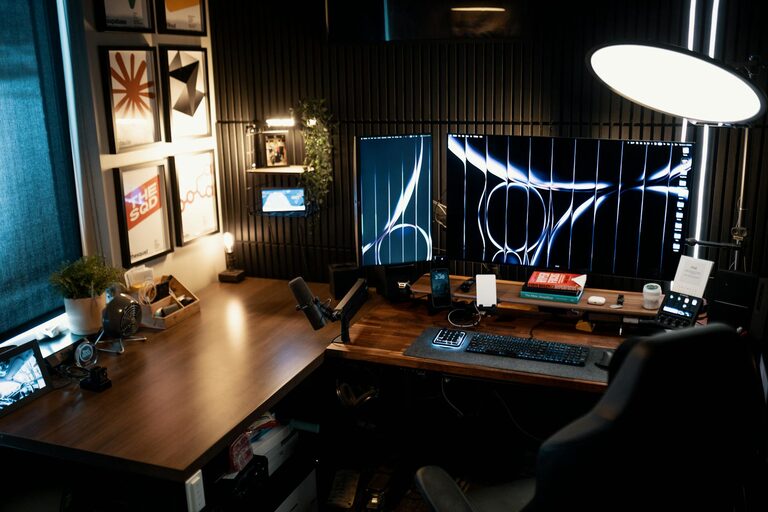

Creating a productive home office environment is essential for anyone working remotely or managing tasks from home. A well-designed workspace encourages focus, minimizes distractions, and helps maintain a healthy work-life balance. Whether you’re setting up a new office or improving your current one, these tips can help you create a space that supports your best work.
Choose the Right Location
Selecting the best spot for your home office is the first step toward productivity.
– Quiet and Private: Find a place away from heavy foot traffic, noise, and interruptions. A separate room is ideal, but a quiet corner can also work.
– Good Lighting: Natural light boosts mood and reduces eye strain. Position your desk near a window if possible. If not, invest in quality artificial lighting that mimics daylight.
– Comfortable Temperature: Ensure the area is well-ventilated and at a comfortable temperature to avoid distractions caused by being too hot or cold.
Invest in Comfortable Furniture
Comfort is key to maintaining productivity throughout the day.
– Ergonomic Chair: A supportive chair reduces back and neck pain. Look for one with adjustable height, lumbar support, and cushioned seating.
– Desk Size and Height: Choose a desk with enough space for your computer, documents, and essential accessories. The height should allow your wrists to rest comfortably when typing.
– Adjustable Furniture: Consider adjustable desks or standing desks to switch positions and reduce the risk of fatigue from sitting too long.
Keep Your Workspace Organized
An organized workspace encourages clear thinking and efficiency.
– Declutter Regularly: Remove unnecessary items and keep only what you frequently use on your desk.
– Storage Solutions: Use shelves, drawers, or filing cabinets to store supplies and documents neatly.
– Cable Management: Use clips, ties, or cable boxes to keep cords under control and off your desk surface.
Minimize Distractions
Limiting distractions can significantly enhance your focus.
– Set Boundaries: Communicate your work hours to family or roommates and ask for minimal interruptions.
– Digital Distractions: Turn off non-essential notifications on your phone and computer. Use productivity apps or browser extensions that block distracting websites during work hours.
– Noise Control: Use noise-cancelling headphones or play white noise or soft music to create a distraction-free atmosphere.
Personalize Your Space
Adding personal touches can make your office inviting and motivate you to spend time there.
– Inspiring Decor: Incorporate artwork, plants, or photos that make you happy and inspired.
– Motivational Quotes: Place quotes or reminders that boost your confidence and positivity.
– Comfort Items: Include a cozy blanket, a mug for your favorite drink, or a small fan or heater to keep comfortable.
Optimize Technology and Tools
Having the right technology setup can improve work efficiency.
– Reliable Internet: Ensure your internet connection is fast and stable to support video calls and data transfers.
– Quality Equipment: Use monitors, keyboards, mice, and headsets that enhance comfort and productivity.
– Backup Solutions: Regularly back up your data with external drives or cloud services to prevent data loss.
Establish a Routine
A consistent routine helps differentiate work time from personal time.
– Set Work Hours: Begin and end your workday at consistent times to build structure.
– Breaks: Schedule short breaks to rest your eyes, stretch, or take a walk. This helps maintain energy and reduces stress.
– Daily Goals: Write down key tasks to accomplish each day to stay focused and motivated.
Maintain Good Posture and Health
Physical well-being directly impacts your ability to concentrate.
– Ergonomic Practices: Keep your screen at eye level, feet flat on the floor, and wrists in a neutral position while typing.
– Stretching and Movement: Incorporate stretches or small exercises during breaks to prevent stiffness and improve circulation.
– Hydration and Nutrition: Keep a water bottle nearby and snack on healthy foods to maintain energy levels.
Utilize Natural Elements
Incorporating nature into your workspace can reduce stress and uplift your mood.
– Plants: Indoor plants improve air quality and add a touch of greenery.
– Natural Colors: Use calming colors like greens, blues, or earth tones to create a soothing environment.
– Fresh Air: Open windows when possible to circulate fresh air and refresh the space.
Regularly Evaluate and Improve
Your needs may change, so it’s important to reassess your home office setup periodically.
– Solicit Feedback: If you share your space with family, ask for input on how to reduce distractions.
– Adapt to New Tasks: Adjust your setup as your work changes to stay efficient.
– Stay Updated: Keep up with ergonomic trends and new technology to continually enhance your workspace.
—
Creating a productive home office is about more than just setting up a desk and chair. By thoughtfully considering location, comfort, organization, and personal preferences, you can build an environment that supports focus and well-being. Implement these tips step-by-step, and you’ll find working from home both enjoyable and efficient.