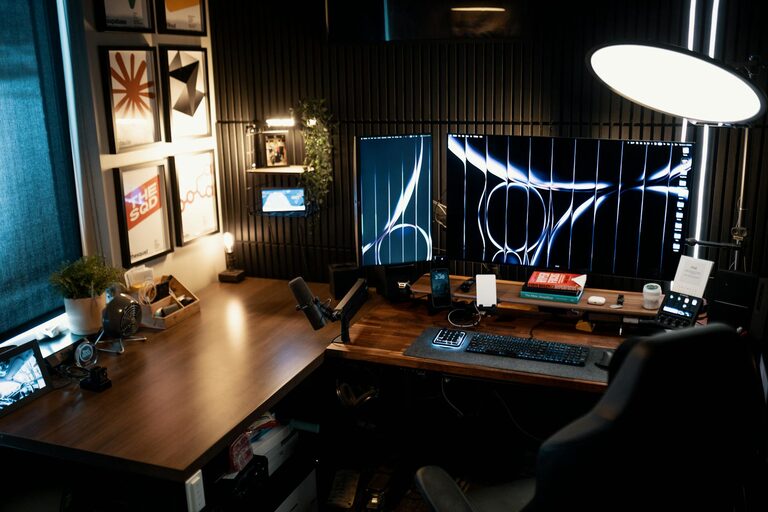
Creating a comfortable and productive home office space is essential for anyone working remotely or managing tasks from home. A dedicated workspace helps separate professional life from personal life, improves focus, and increases efficiency. Whether you have a large room or a small corner, this guide will walk you through practical steps to design a home office that suits your needs.
Why a Dedicated Home Office Matters
Having a designated area for work helps your brain associate the space with productivity. It supports focus, minimizes distractions, and fosters a separation between work and relaxation. Comfortable and organized workspaces also reduce stress and physical strain.
Choosing the Right Location
Find a Quiet Spot
Look for a place in your home that is quiet and away from the main traffic areas. If you share your space with others, try to set up in a room or corner where interruptions are least likely.
Utilize Natural Light
Position your desk near a window if possible. Natural light not only brightens your room but also improves mood and energy. Avoid placing your computer screen directly in front of the window to reduce glare.
Consider Ventilation and Temperature
Good airflow and comfortable temperature settings make long work hours easier. A room that is too hot or cold can distract and reduce productivity.
Selecting Furniture for Comfort and Functionality
Desk
Choose a desk that suits your tasks and space. It should have enough surface area for your computer, accessories, and any paperwork. Adjustable desks can offer the option to sit or stand during the day.
Chair
Invest in an ergonomic chair with lumbar support. Since you’ll spend many hours seated, a comfortable chair helps prevent back pain and promotes good posture.
Storage
Include shelves, drawers, or filing cabinets to keep your workspace tidy. Clutter can be distracting, so having storage solutions keeps everything organized and within reach.
Organizing Your Workspace
Keep Essentials Handy
Arrange frequently used items—like pens, notebooks, and your phone—near your desk to limit interruptions during work.
Manage Cords and Devices
Use cable organizers to keep cords untangled and out of sight. A clean workspace looks more professional and helps reduce stress.
Use Desk Accessories
Consider a pencil holder, desk tray, or small plants to personalize and organize your area without crowding it.
Lighting Your Home Office
Add Task Lighting
In addition to natural light, use adjustable desk lamps that provide focused light on your work surface. This reduces eye strain, especially in the evening.
Avoid Harsh Overhead Lighting
Soft, warm lighting is less tiring on the eyes and creates a comfortable atmosphere.
Personalizing Your Space
Adding personal touches like artwork, photos, or motivational quotes can make your workspace inviting. Just be careful not to add distractions.
Incorporating Technology
Reliable Internet
Ensure your home office has a stable and high-speed internet connection for video calls and uploads.
Essential Equipment
Depending on your work, invest in quality headphones, webcams, or printers to support your daily tasks.
Establishing a Routine
Designing a great office space supports a focused work routine. Set regular work hours, take breaks, and keep your workspace for work only.
Maintaining Your Workspace
At the end of each day, tidy your desk and prepare your space for the next day. Regular cleaning promotes a fresh and inviting environment.
Final Thoughts
Creating a comfortable and productive home office can be simple with thoughtful planning. Focus on ergonomics, organization, lighting, and personalization to build a space that helps you work efficiently and feel good throughout the day.
With these tips, you can transform any part of your home into a pleasant and effective workspace, making remote work or home projects more enjoyable and successful.