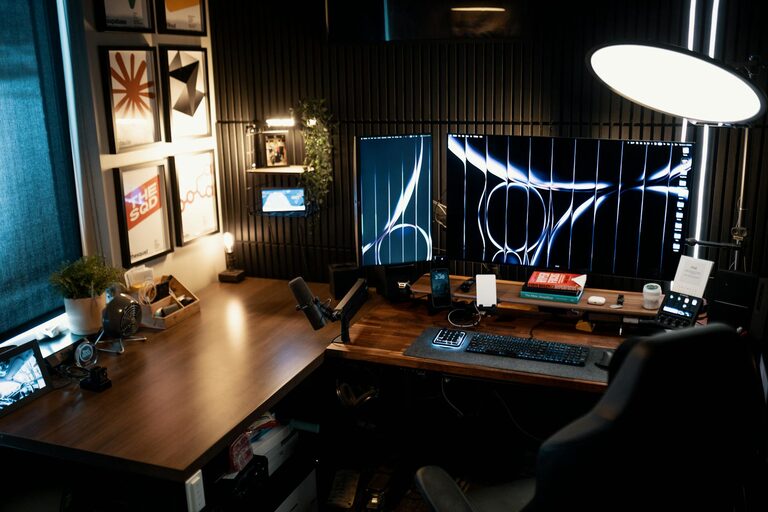

Creating a home workspace that feels both relaxing and productive can make a significant difference in your daily work experience. Whether you’re working remotely full-time or occasionally from home, the right environment can reduce stress and increase focus. Below are some helpful tips to design a workspace that supports comfort and maximizes your efficiency.
Why a Relaxing Workspace Matters
A well-designed workspace can influence your mood, motivation, and overall output. When your environment feels calm and inviting, distractions tend to fade away, allowing you to concentrate better. Comfort also reduces physical strain, enabling longer periods of work without discomfort or fatigue.
Choose the Right Location
Start by selecting a spot in your home that suits your work style.
– Quiet and Private: Try to find a space away from heavy foot traffic, loud appliances, or noisy family members.
– Natural Light: Position your desk near a window to benefit from daylight, which boosts mood and reduces eye strain.
– Minimal Distractions: Avoid areas that serve as entertainment or relaxation zones, like the living room couch or bedroom, if possible.
Invest in Ergonomic Furniture
Comfort plays a crucial role in productivity. Your furniture should support your body and prevent pain.
– Ergonomic Chair: Choose a chair with good lumbar support, adjustable height, and comfortable padding.
– Desk Setup: Ensure your desk is at a height where your arms rest comfortably when typing. Consider adjustable desks if you like alternating between sitting and standing.
– Monitor Position: Place your computer screen at eye level about an arm’s length away to avoid neck strain.
Personalize Your Space with Calming Elements
Adding touches that bring you calm can improve your focus and well-being.
– Colors: Soft, neutral colors like light blues, greens, or greys promote relaxation. You may use these on walls, furniture, or accessories.
– Plants: Introduce some greenery. Plants not only beautify your space but also help purify the air and reduce stress.
– Artwork: Choose inspiring or serene artwork that makes you happy and relaxed.
Organize to Reduce Clutter
A tidy workspace helps maintain a clear mind.
– Storage Solutions: Use shelves, drawers, and organizers to keep paperwork and supplies in order.
– Cable Management: Use clips or sleeves to keep cords neat and out of sight.
– Daily Clean-Up: Spend a few minutes at the end of each workday to put things away and clear your desk.
Optimize Lighting
Proper lighting is essential for comfort and effectiveness.
– Natural Light: As mentioned, natural light is best during the day.
– Task Lighting: Invest in an adjustable desk lamp for focused light when needed, especially for reading or detailed work.
– Avoid Glare: Position screens and lamps to prevent glare, which can cause headaches and tired eyes.
Incorporate Soothing Sounds
Sound can either distract or enhance productivity.
– Background Music: Soft instrumental or ambient music can increase focus for some people.
– Noise-Cancelling Headphones: If your environment is noisy, these can block distractions and create a peaceful bubble.
– White Noise Machines: These generate consistent sounds that mask disruptive noises.
Maintain Comfortable Temperature and Air Quality
Your physical comfort affects how well you can concentrate.
– Temperature: Set your workspace temperature to a comfortable level, generally between 68°F and 72°F (20°C-22°C).
– Ventilation: Ensure good airflow to keep the air fresh. A small fan or air purifier can help enhance air quality.
Take Breaks and Stretch
Even the best workspace can’t substitute for healthy work habits.
– Regular Breaks: Follow a routine like the Pomodoro technique—work for 25 minutes, then take a 5-minute break.
– Movement: Stand, stretch, or walk around briefly during breaks to reduce stiffness and boost circulation.
– Eye Rest: Look away from screens every 20 minutes to reduce eye strain.
Use Technology Wisely
Technology can support your workflow, but it should not overwhelm.
– Declutter Digital Spaces: Organize files and clear your desktop to reduce digital clutter.
– Limit Notifications: Turn off non-essential alerts to maintain focus.
– Use Productivity Tools: Apps for task management, timers, or note-taking can help streamline work.
Final Thoughts
Designing a relaxing home workspace that encourages both comfort and productivity takes some thought but pays off in a better work experience. By choosing the right location, investing in ergonomic furniture, adding calming personal touches, and maintaining organization, you create an environment where you can focus, stay energized, and feel good throughout your workday.
Start small with a few changes and adjust as you discover what works best for you. With time, your workspace can be not just a place to work, but a place that supports your wellbeing and success.